nf-ccloud Launch: Benchmarking Deep Dive
The launch of Carolina Cloud’s custom Nextflow executor is around the corner. In this post I share the hard numbers on speed up against the competition.
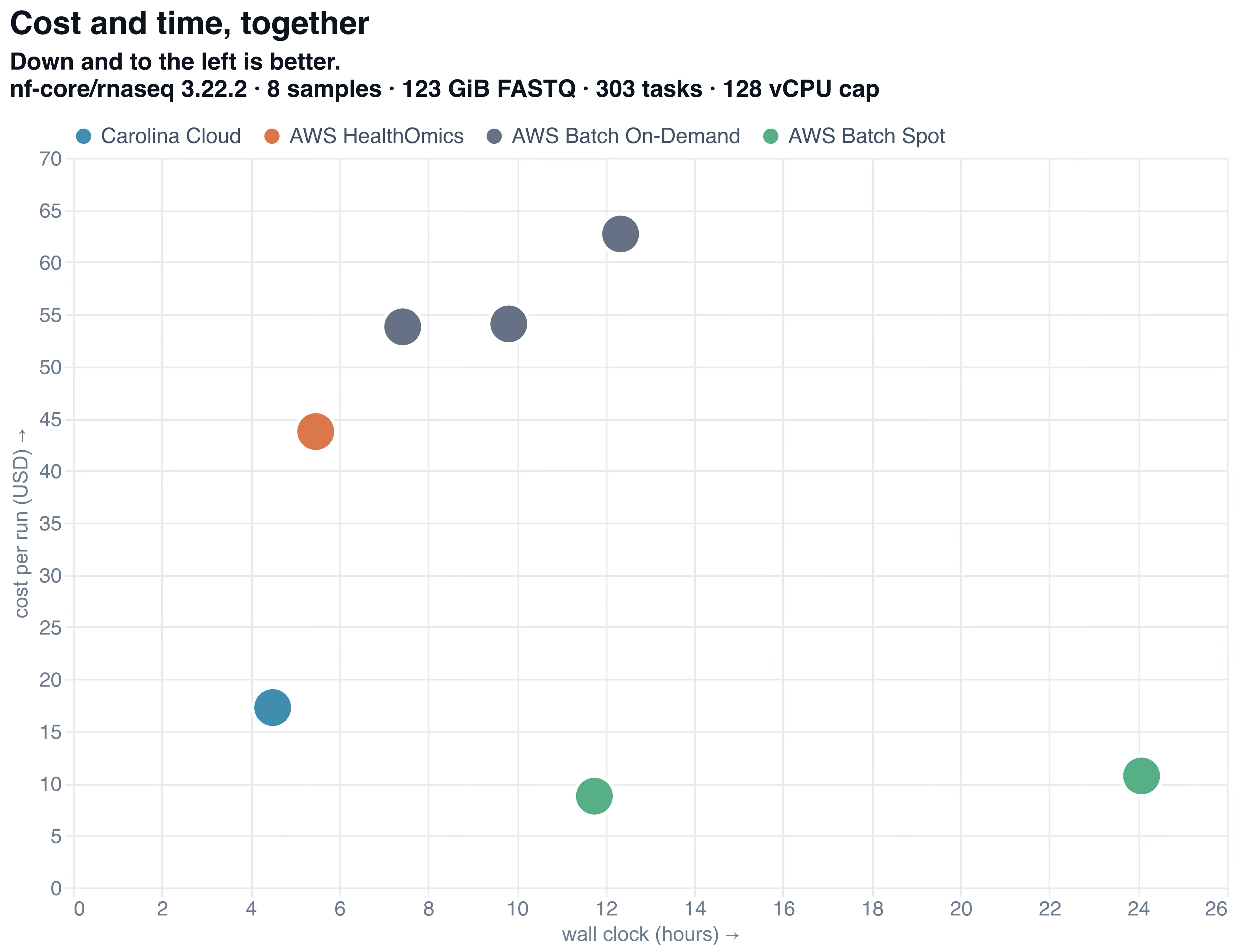
Most important chart in this entire article
tl;dr We benchmarked nf-ccloud vs AWS Healthomics and AWS Batch (via Seqera UI, both on-demand and spot). nf-ccloud finished in 4.5hrs at less than $20. AWS Healthomics finished in 5.5hrs at $45. Batch on-demand ran around 7-8h at $70 and batch spot ran anywhere between 10h and 24h but was the cheapest ad just under $10. You can view the Carolina Cloud run here. Shout out to Flock Bio for helping us benchmark.
Introduction and Context
We just launched nf-ccloud, our own Carolina Cloud native Nextflow executor. After finishing it internally, it was time to exhaustively benchmark it against its biggest competitors.
The above chart is the boiled down version of those extensive test and shows what users care about most: speed and cost. nf-ccloud is the blue dot closest to the origin (fast and cheap). If you don’t make it any further in this post then that’s the take away, and I’m glad we got at least that clear.
To try it out, simply head to the Carolina Cloud Console, spin up a Nextflow Head Container, sign in to Claude Code (which is already installed) and ask it how to run a pipeline on Carolina Cloud.
Or if you prefer to run it locally, then paste the following message to your AI:
Please read https://console.carolinacloud.io/static/nextflow/local-guide.md
and walk me through how to run my first pipeline
But now let’s break it down. First an overview of the benchmark, then orchestration time, then a deep dive of each product.
The Benchmark
Let’s lay out the rules of the game before we present any numbers.
-
RNA-Seq 3.22
-
Profile was test_full
-
Eight human RNA-seq samples (123.3GiB of gzipped FASTQ)
-
GRCh37 reference
-
Pre-built STAR index
-
128 concurrent vCPU limit
Our aim was to pick a representative workload and nf-core/rnaseq, the most popular pipeline on nf-core, was the obvious choice.
Orchestration Time (shout out to Flock Bio)
First, our strongest result. nf-ccloud’s spin-up and spin-down of tasks is 47x faster than AWS. For a three-day run with only five tasks you won’t notice a difference. However for an nf-core/rnaseq on just one sample (a very common pipeline), you’re paying that spin-up tax on every single task. Hundreds of tasks at 3-minute spin up, even with moderate parallelization, can add substantial time to your pipeline (and substantial money, since AWS both charges for provisioning time). Finally, AWS has a 60s minimum for their instances which may not sound like much but with our rapid spin-up and spin-down time and over 300+ tasks per nf-core/rnaseq, it can add up.
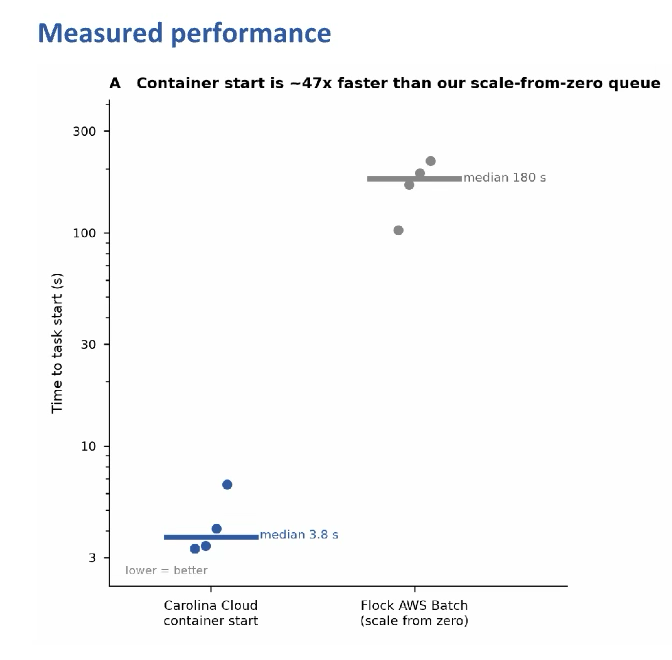
Carolina Cloud obliterates AWS on task start time
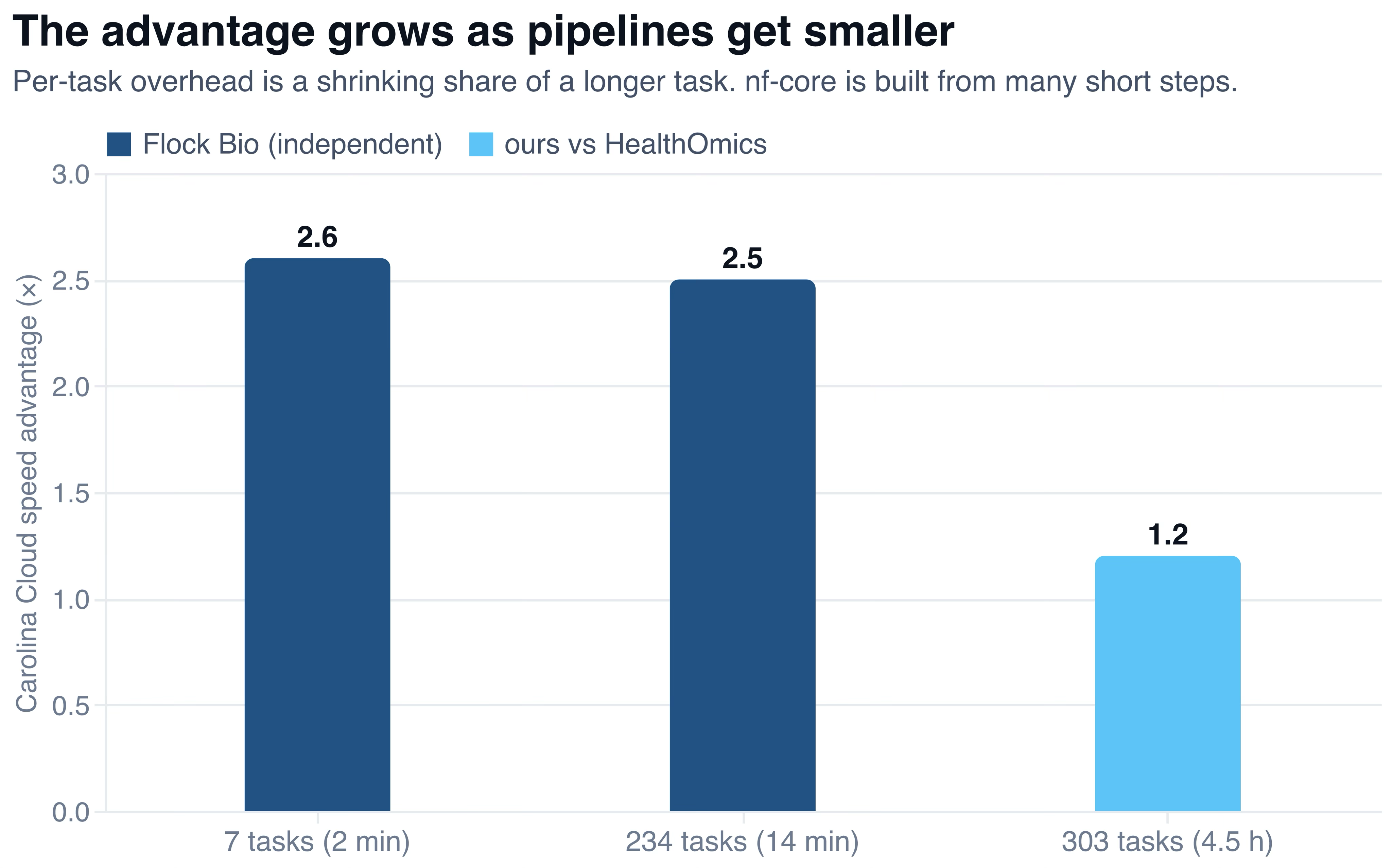
If your job runs for 5 days then you might no longer care about task start time
Batch with On-Demand
I’m not going to write much about this because it’s more expensive and slower than both HealthOmics and Carolina Cloud.
Who should use Batch with On-Demand? Anyone incentivized to spend more, not less, money with AWS, such as certified AWS partners who receive a kickback for extra spend they induce.
Batch with Spot
Batch and spot was both the cheapest and slowest of the bunch. We did several runs — with and without the Seqera Fusion filesystem, intel vs AMD CPUs, etc. We found batch ran from 7h at the fastest to over 24h at the slowest. On-demand batch was over $70 in cost at worst, and spot batch was under $10 at best.
Why was it slow? Because there is volatility in the spot market (our friends at HMX Labs in London have written about this extensively). The most common instance type for these tasks, weighted by cost, was the r8a.4xlarge, which is apparently a popular choice. Our 24h run, as you can probably guess, only took so long because the instance types we requested simply weren’t available when we did our run (which is odd as it was a weekend). So with this 24h run, the majority of the wall clock time was simply spent waiting for the correct spot instance to become available.
A specific kind of shrewd reader will suggest that we “just switch regions”. The issue with that is egress fees. If you’re using AWS you’re likely using S3. And if you’re using S3 in us-east-2, and you want to tap into the spot liquidity of us-east-1, you must move data from us-east-2 to us-east-1. At $0.02/GiB of egress fees to move between regions and a 123GiB reference genome used in this trial, that would be over $2 per process that requires our FASTQs.
What if we just replicate our data? We could, but that means paying inter-region egress on your entire bucket once and then paying to store it indefinitely. There’s then the mental overhead of having to keep (and pay for) all data in all regions. So at $0.02/GiB for inter-region transfer you’re looking at $20/TB for a one-time transfer and then $23/TB/mo thereafter. There’s actually also NAT Gateway to contend with (at $0.045/GiB for workload pulls). It also means managing two buckets, keeping them in sync, new IAM rules, updating the input paths to the samples etc.
Furthermore, as far as I’m aware, Batch compute environments can span only one region, meaning that you’d be unable to simply “just use multiple regions” with one batch compute environment which is what is offered by Seqera for their AWS Batch Compute Environments. So to conclude this section: If your sole goal is to optimize financial cost, and you are able to pay the time cost necessary to properly configure compute environments, then you should use batch on spot. That’s a fact and we’re comfortable admitting it. And in fact, if that’s you, then out of respect for your time, you can stop reading here. Go spend your time on configuring compute environments (you’re going to need it).
Who should use Batch with Spot? Scientists who stand to save more against Carolina Cloud or Healthomics than the person who is being paid to configure and troubleshoot Nextflow. For example if you’re spending $500k/yr on Carolina Cloud and cleverly-configured batch with spot setup gets you to around $200k/yr, you’ve saved $300k and so it’s worth paying a cloud engineer up to $150k to claim these cost savings, assuming the pipeline run time variance doesn’t bother you.
AWS HeathOmics
HealthOmics was clearly created to spare users the configuration headaches we just discussed. Its wall-clock performance was strong, its configuration complexity was medium and it was in the middle of the pack cost-wise, coming in at $45 (excluding ECR storage costs), or about 2.2x the cost of Carolina Cloud. One hidden cost with HealthOmics (both a time and financial cost) is that you must pre-fill your ECR (EC2 Container Registry) with the container images that your pipeline will require. Not only did I find this step excruciating (even with Claude Code and a career using containers in the cloud) but also these stored containers take up storage which is, of course, not free. For this pipeline the stored container cost was $0.04/day in perpetuity which at current interest rates is equal to around $300 of net present value. And at no point was this additional storage cost communicated to us while setting up the container registry.
nf-ccloud is most comparable with HealthOmics. They both offer a low-config way to run Nextflow. Setting up the container registry is annoying but it’s nothing compared to the batch config. Aside from that, despite some quality-of-life improvements on Carolina Cloud (for example, our head container). If you’ve kept reading, then I think our conclusion is relevant to you and so I will state it plainly:
We sincerely believe that this benchmark proves that nf-ccloud is cheaper, faster and better than HealthOmics. Who should use HealthOmics? People who are already using HealthOmics and simply can’t be bothered to switch (that sounds sarcastic but it is not). People using batch who are fed up with config and but want to stay on AWS. Companies for whom their genomic compute spend is a small percentage of their overall opex. Anyone on GovCloud (taxpayer is paying anyway, so who cares about cost?). Anyone who has AWS credits already.
Carolina Cloud (public demo)
Carolina Cloud came in at 4.5hrs and a total of $19.26. That includes everything except for storage, which will of course depend on how long you keep it there.
Now with the pipeline complete, what’s the logical next step? To open R or Python with a single click obviously!
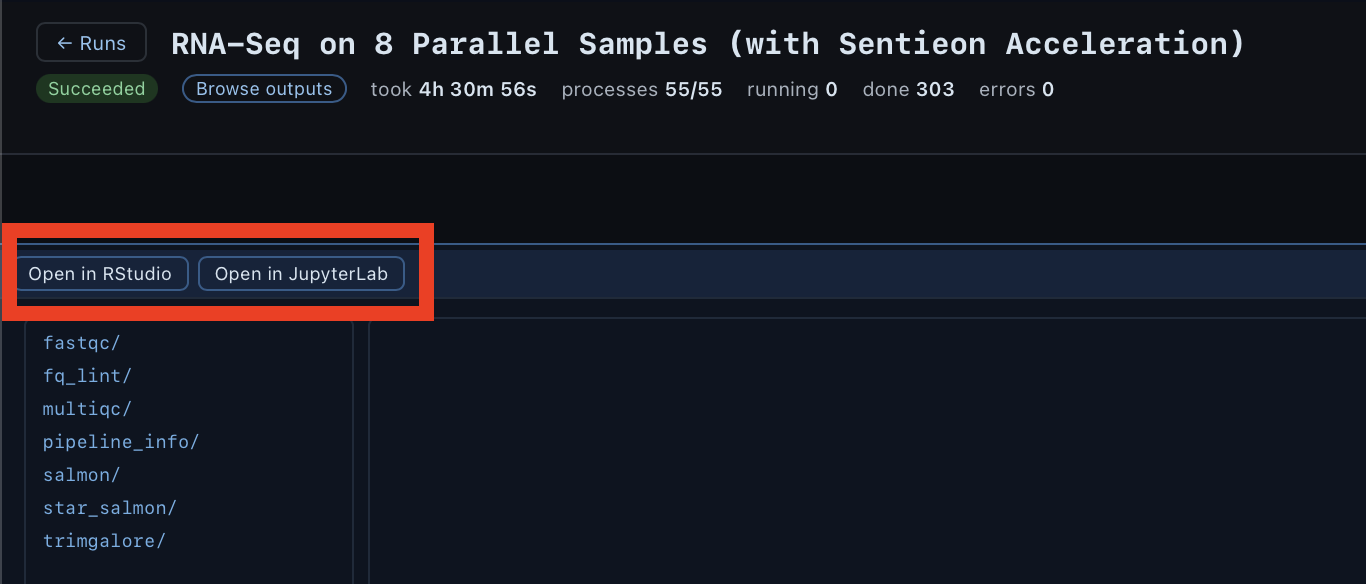
One click and you’re off to the races
We have a whole separate launch post for nf-ccloud so please go read about it here.
Who should use Carolina Cloud? If you, like my cofounder Alice, experience anaphylaxis when confronted with a maze of cloud configuration standing between you and your scientific pursuits. If you use Claude Code and want a debug log to paste to your LLM for every single run failure. If you want to immediately open your results in R Studio Server with a single click. And if you want a first-class visualization of your pipeline as it runs that can be easily shared with your team.
Who should not use Carolina Cloud? If you still have AWS credits (nothing beats free). If you’re a cog in a large institution with zero control over the tools you use, even when they’re in the best interest of the company (as I once was).
Sentieon STAR vs open-source STAR?
A shrewd reader might notice that we used the Sentieon-accelerated STAR aligner on the Carolina Cloud pipeline but used only open-source on the Healthomics and Batch pipelines. That is a fair assessment so it deserves an explanation, especially because Sentieon is available on the AWS Marketplace. Our aim was to compare like-for-like from the user’s perspective. Using Sentieon acceleration on Carolina Cloud is a simple as passing —use-sentieon-star to one’s nextflow run command. Using it on AWS requires trawling through even more UIs and purchasing a Sentieon license.
And while you could say it’s not fair to compare Sentieon-accelerated Carolina Cloud vs open-source HealthOmics on performance, you could also say it’s not fair to compare open-source HealthOmics to Sentieon-surcharged Carolina Cloud on cost.
So the tl;dr of this is: because Sentieon is so seamlessly integrated with Carolina Cloud, process-based billing and all, we felt that it was fair to include since it offers a material upgrade without any extra effort. In other words we benchmarked the “best available with no extra config” on both platforms.
Also, the Sentieon item on the AWS marketplace looks to cost $2mm USD. This must be a mistake, but the time required to understand why and how this mistake came to be is exactly what you don’t have to spend with nf-ccloud.
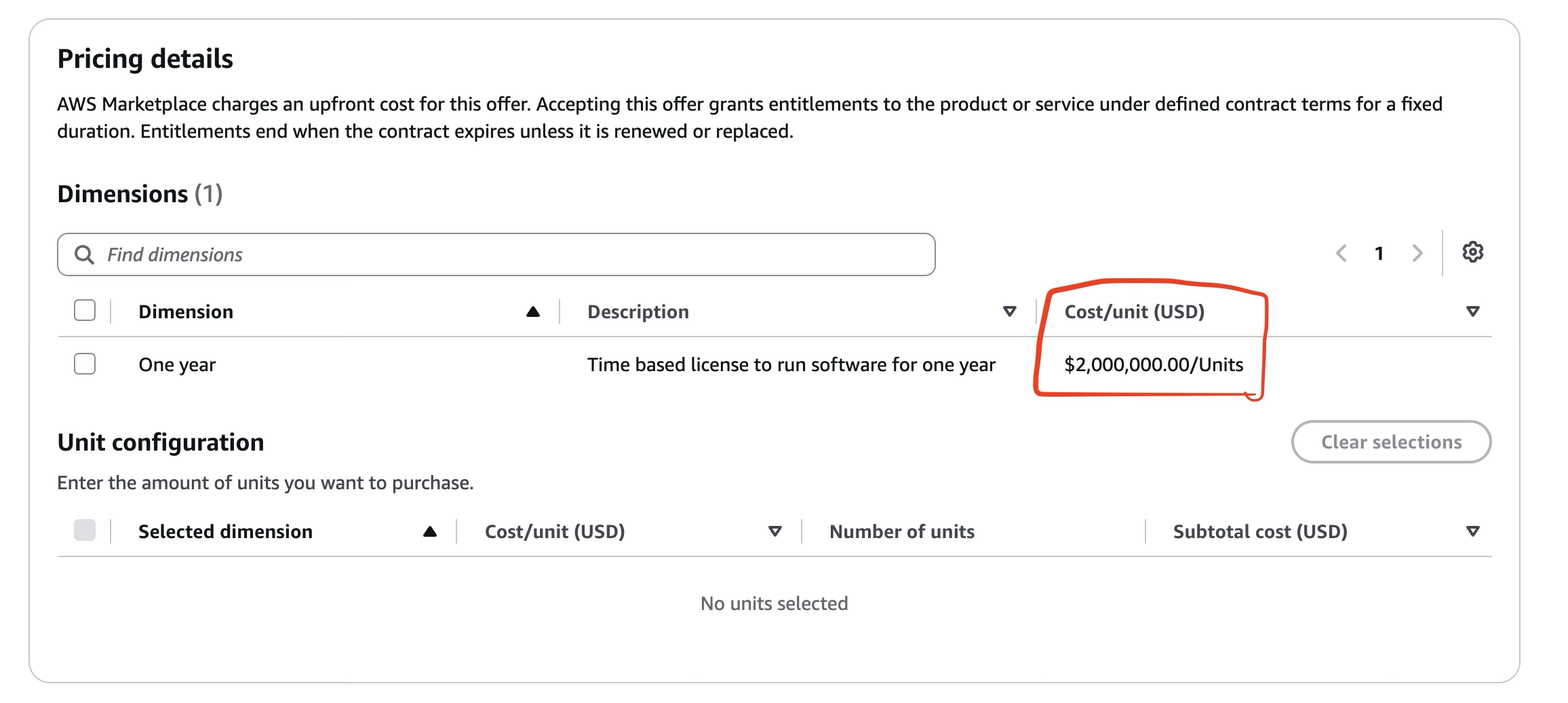
Did someone accidentally put a bottle of tequila on the 0 key while inputting the price here?
The Cost Discovery Overhead
AWS and cost transparency are like oil and water. They don’t mix. Apparently a handful of backend SQL queries such as
select cost_usd from usage where user_id = ‘me’ and service = ‘healthomics’ group by ‘date’
is too much to ask for one of the most technologically sophisticated organizations in human history (I’d contend that it’s by design, and one of the reasons I’m a proud holder of AMZN, but that’s a separate discussion).
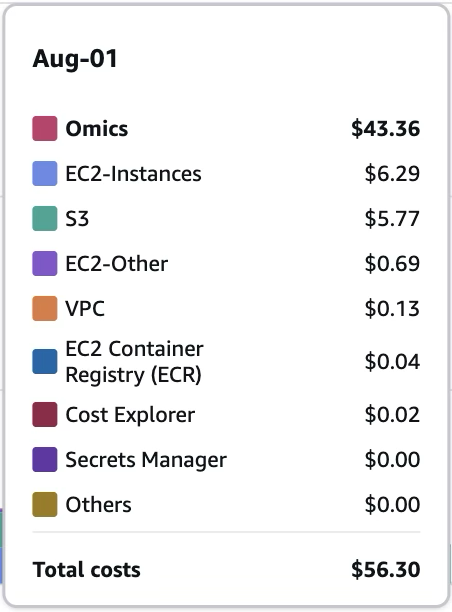
$0.02 for cost explorer is like your credit score going down whenever there’s an inquiry
So I took a simpler approach: do to only one run per day and then filter cost on that day only. Use no other AWS services on that day (except for lingering S3 storage costs, which thankfully I am able to calculate and subtract manually). I had a lot on my plate while doing this benchmark and I didn’t have time to spend doing open heart surgery on the cost explorer.
Lastly, I noticed “VPC” creeping in. Biologists do not know or care what this is. But at $0.13/day, that’s $3/mo. What is ECR? It’s what HealthOmics requires you to make (and Carolina Cloud doesn’t) prior to running. Why make such a point over $0.13/day? Because despite the low magnitude, there is absolutely zero transparency on this charge. I didn’t know about until I went to the cost explorer. Carolina Cloud puts the full task-level cost on each task as well as the pipeline-level cost in real time, front and center. Cost transparency is very important to us. Check it out on our public demo.
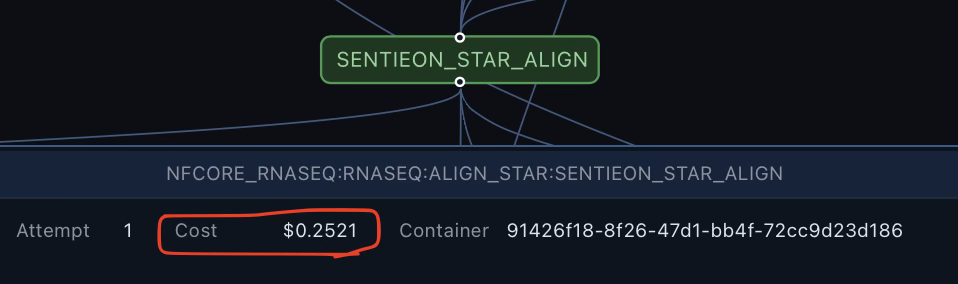
Not only can you see how much the full run cost, you can also see how much individual tasks in that run cost
Conclusion
We believe Carolina Cloud is superior to AWS HealthOmics. Its performance and UX is superior to batch, but batch on spot is cheaper than even Carolina Cloud.
So if you’re running hundreds of thousands of dollars of Nextflow compute per year, your company is not in growth mode and you don’t mind variable times for pipeline completion, then you should use batch with spot. There are other Nextflow platforms out there, almost all of whom resell AWS and apply a nontrivial markup, but they shall not be mentioned.
Appendix
Link to a GitHub repo with even more nitty-gritty details. Go find problems with my numbers. I dare you.